
Slate Viewer guide
Open and read Markdown files on Mac
A Markdown file is often ready to read, not ready to become a coding task. Slate Viewer gives local reports, notes, README files, and AI-generated documents a quiet reading view, with the original source available when you need it.
Quick answer
To open an .md file on Mac, choose Slate Viewer from Finder’s Open With menu or open the file from Slate Viewer. It renders local .md and .markdown files in Preview, keeps the original Markdown in Raw, supports focused changes in Light Edit, and includes a Finder Quick Look extension.
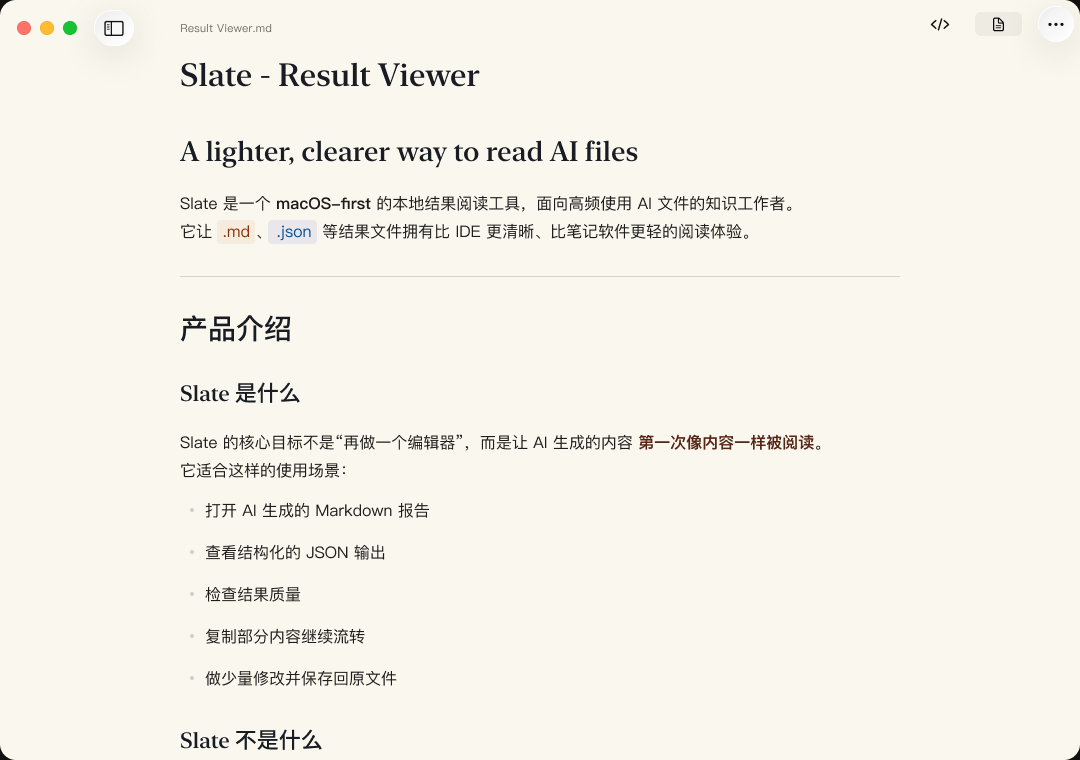
Start with the document, not its syntax
Markdown is plain text, but the result is usually meant to be read as a document. Slate Viewer begins with headings, paragraphs, lists, and spacing, so you can understand the file before deciding whether its source needs attention.
Preview also keeps common document structure visible, including links, block quotes, tables, task lists, inline code, and fenced code blocks. Raw remains one click away when the exact punctuation matters.
Use Quick Look for a glance, then open the reader to check
For a one-page report or README, select the Markdown file in Finder and press Space after enabling Slate Viewer’s Quick Look extension. That is the fastest way to decide whether the file is the one you need.
Open the same file in Slate Viewer when the question becomes more specific: find a term, follow an outline, compare the rendered document with its source, or return to where you stopped reading. Quick Look is a short inspection; the reader is for the next step.
How to open an .md file on Mac
- Find the file. Locate the
.mdor.markdowndocument in Finder. - Open it with Slate Viewer. Use Finder’s Open With menu, or open the file from inside Slate Viewer.
- Read Preview first. Use the rendered document for review, then switch to Raw only when you need to inspect the Markdown source.
- Use Quick Look for a fast check. Once the included extension is enabled, select a Markdown file in Finder and press Space.
A reader-first Markdown workflow
- Orient yourself in Preview. Read the headings and the rendered table or code block before deciding what needs checking.
- Search and move through the document. Use Command-F to find a name or phrase; Command-G and Shift-Command-G move through matches. When headings matter, use the outline to jump to a section and return to your earlier reading point.
- Switch to Raw when the source matters. Check the exact Markdown behind a link, delimiter, list, or fenced code block.
- Keep any edit focused. Use Light Edit for a small supported local text correction, then return to reading. When you reopen a Markdown document later, Slate Viewer can restore the last reading position.
Example: checking an AI-generated project brief
Suppose an AI tool leaves a project-brief.md file with a summary, a task table, and a code example. First read the Preview to see whether the brief answers the original question. Search for the project name or a missing requirement, then use the outline to move between sections. If a table value or code fence looks wrong, switch to Raw to inspect the source instead of guessing from the rendered view.
If the brief links to local Markdown images, Slate Viewer can display them after you authorize the containing folder. The authorization keeps that access on your Mac; it does not turn the document into a cloud upload.
Markdown Quick Look in Finder
Slate Viewer includes Quick Look support for Markdown, so you can preview a `.md` or `.markdown` file from Finder before opening it. Quick Look is intentionally limited to Markdown in Slate Viewer 1.4.1; JSON, JSONL, CSV, TSV, TXT, and LOG files open in the app itself.
A reader, not a Markdown workspace
Slate Viewer fits when the file already exists and your next task is to read, verify, or make a small local correction. It does not ask you to create a vault, project, or cloud library around the document. For long-form authoring, repository-wide editing, or a full coding workflow, keep using the editor or IDE built for that job.
The difference is broader than Markdown: the same reader-first workflow also opens JSON, JSONL/NDJSON, TXT/LOG, CSV, and TSV when an AI tool or local process produces a mixed set of result files.
Slate Viewer for Mac is a local file reader. It is unrelated to Unreal Engine’s Slate UI framework.
Local by default
Slate Viewer opens Markdown files on your Mac. It does not upload document text, file paths, or clipboard contents to Slate Viewer servers by default. It does not generate AI content or create another cloud workspace around the file.
Related guides
Slate Viewer for Mac